The easiest way to integrate with the Parcelforce API
Add the Parcelforce API to your WMS, ERP, or e-commerce backend through one Sendcloud integration. Sendcloud keeps the integration current when Parcelforce releases API updates, alongside 170+ other carriers.
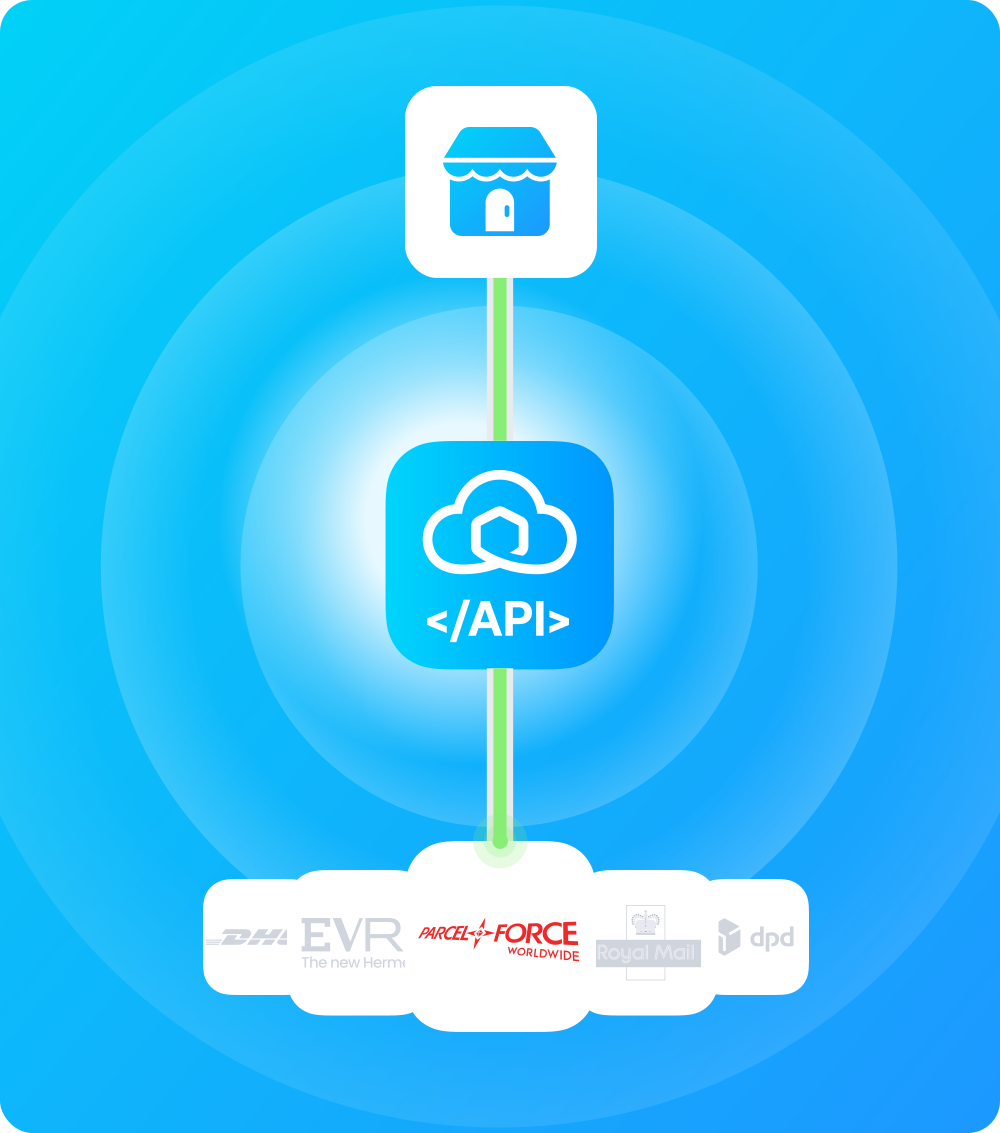
The easiest way to integrate with the Parcelforce API
Add the Parcelforce API to your WMS, ERP, or e-commerce backend through one Sendcloud integration. Sendcloud keeps the integration current when Parcelforce releases API updates, alongside 170+ other carriers.
The easiest way to integrate with the Parcelforce API
Add the Parcelforce API to your WMS, ERP, or e-commerce backend through one Sendcloud integration. Sendcloud keeps the integration current when Parcelforce releases API updates, alongside 170+ other carriers.
Thoroughly documented
Tested on millions of shipments
Available on all plans
Why integrate Parcelforce through the Sendcloud API?

UK express with 200+ international destinations
Parcelforce is Royal Mail Group's express parcel brand with next-day domestic delivery across the UK. Sendcloud manages service selection and label creation without a separate Parcelforce API agreement.

11,000+ Post Office® drop-offs
Parcelforce uses Royal Mail's Post Office® network for parcel drop-off across the UK. Sendcloud returns the nearest drop-off location via the service point API.

Integrate with 170+ carriers at once
Stop maintaining and integrating different carrier and use one API for all.

GDPR Compliance
We comply with the GDPR rules to protect data and privacy in Europe.

API uptime of 99.99%
Reliable shipping software built on AWS and with top market technologies.

ISO 27001 Certified
The world’s most rigorous standards for information security.
Why integrate Parcelforce through the Sendcloud API?
UK express with 200+ international destinations
Parcelforce is Royal Mail Group's express parcel brand with next-day domestic delivery across the UK. Sendcloud manages service selection and label creation without a separate Parcelforce API agreement.
11,000+ Post Office® drop-offs
Parcelforce uses Royal Mail's Post Office® network for parcel drop-off across the UK. Sendcloud returns the nearest drop-off location via the service point API.
Integrate with 170+ carriers at once
Stop maintaining and integrating different carrier and use one API for all.
GDPR Compliance
We comply with the GDPR rules to protect data and privacy in Europe.
API uptime of 99.99%
Reliable shipping software built on AWS and with top market technologies.
ISO 27001 Certified
The world’s most rigorous standards for information security.
Why integrate Parcelforce through the Sendcloud API?
UK express with 200+ international destinations
Parcelforce is Royal Mail Group's express parcel brand with next-day domestic delivery across the UK. Sendcloud manages service selection and label creation without a separate Parcelforce API agreement.
11,000+ Post Office® drop-offs
Parcelforce uses Royal Mail's Post Office® network for parcel drop-off across the UK. Sendcloud returns the nearest drop-off location via the service point API.
Integrate with 170+ carriers at once
Stop maintaining and integrating different carrier and use one API for all.
GDPR Compliance
We comply with the GDPR rules to protect data and privacy in Europe.
API uptime of 99.99%
Reliable shipping software built on AWS and with top market technologies.
ISO 27001 Certified
The world’s most rigorous standards for information security.
The complete shipping API for any system
The complete shipping API for any system
The complete shipping API for any system
"Sendcloud allows us to connect to a lot of different carriers seamlessly."
Oscar Ziegler
Founder and CEO
-
Hive

"Sendcloud allows us to connect to a lot of different carriers seamlessly."
Oscar Ziegler
Founder and CEO
-
Hive
"Sendcloud allows us to connect to a lot of different carriers seamlessly."
Oscar Ziegler
Founder and CEO
-
Hive
API integration examples
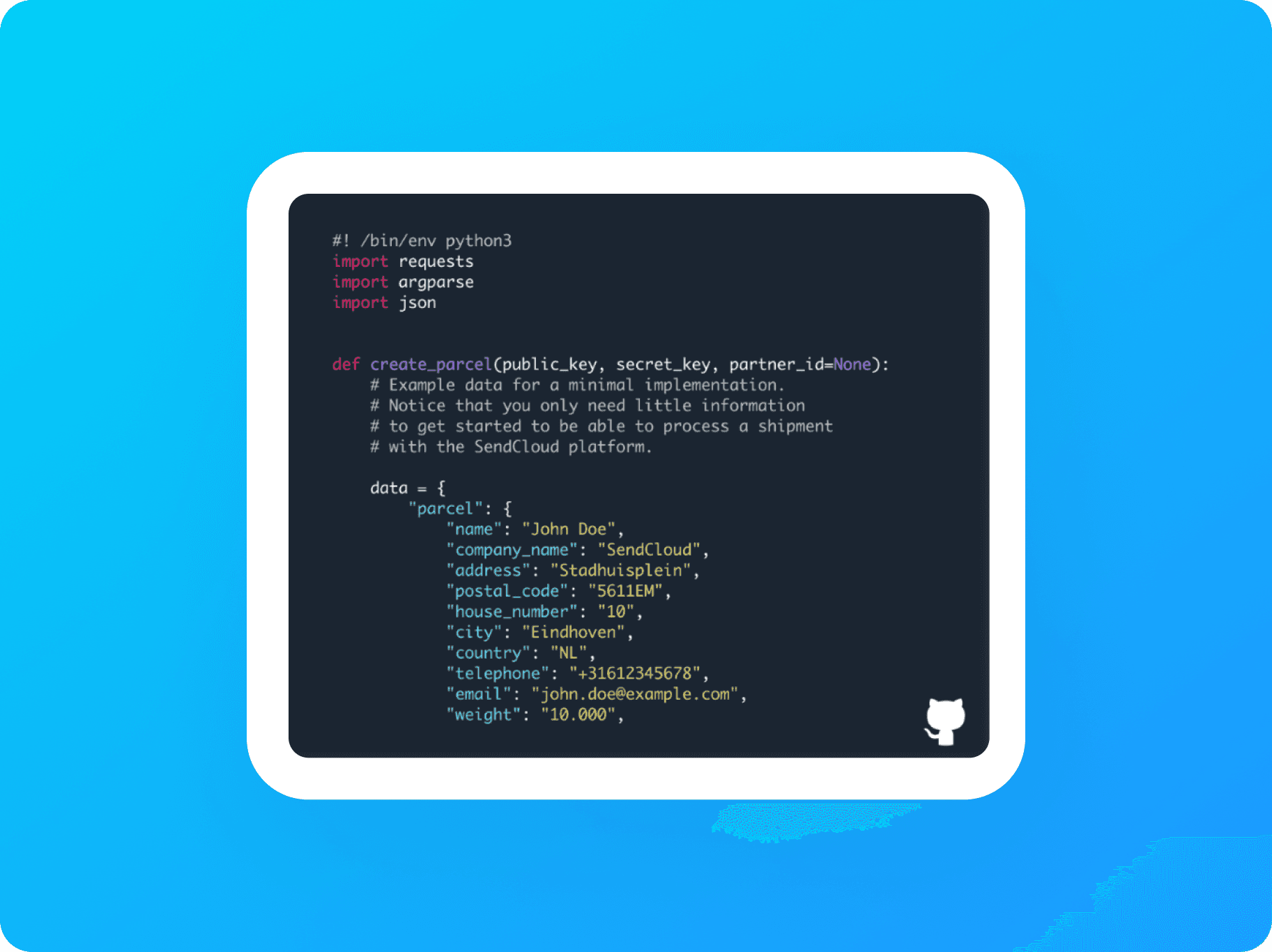
API Integration
See a basic example of an API integration using Python.
Service Point Picker
See how to integrate the Service Point Picker into a custom application.
API integration examples
API Integration
See a basic example of an API integration using Python.
Service Point Picker
See how to integrate the Service Point Picker into a custom application.
API integration examples
API Integration
See a basic example of an API integration using Python.
Service Point Picker
See how to integrate the Service Point Picker into a custom application.



Where do you start?
Where do you start?
Where do you start?


One API for all your shipping needs
No setup fees
Same-day integration
Ship with Europe's top carriers
Questions & answers
Why integrate the Parcelforce API through Sendcloud instead of directly?
Direct Parcelforce integration means setting up the Express Link API, signing a Data Exchange Agreement (DEA) for tracking, and managing your ExpressTransfer number alongside Account Number, Posting Location Code, and Registered Billing Postcode.
Through Sendcloud, you authenticate once with your Sendcloud API key and use a single REST schema for Parcelforce alongside every other carrier in your account. A direct Parcelforce contract is required either way; Sendcloud rates aren't offered for Parcelforce.
What happens when Parcelforce updates or breaks their API?
Parcelforce occasionally has issues returning tracking information; the carrier is aware but tracking may not always update on their side. Direct integrators absorb the cost of monitoring tracking-feed reliability and re-testing payloads when Parcelforce ships changes.
When you ship Parcelforce through the Sendcloud REST API, the abstraction layer takes the hit. Sendcloud's engineering monitors Parcelforce's documentation and adjusts the carrier connector internally. For tracking specifically, Parcelforce-side outages may still affect status updates regardless of integration path.
Can I use my own Parcelforce contract?
Yes, and you have to. Parcelforce requires a direct contract; Sendcloud rates aren't offered. Activate direct debit in Sendcloud first.
In Sendcloud, go to Shipping > Carriers > My Contracts, find Parcelforce Worldwide, and click Add Contract. Enter your Account Number, Account Registered Email, Posting Location Code, Registered Billing Postcode, and address details. Ask your Parcelforce account manager for Express Link API credentials separately.
A Lite, Growth, or Premium plan is required. See the Parcelforce Worldwide contract activation Help Center article.
Which Parcelforce products are supported through the API?
Through Sendcloud, you can ship Parcelforce's domestic UK, European, and global express services through 11,000+ Post Office® drop-off locations:
Parcelforce Euro Economy Dropoff: Europe-wide economy with 2-working-day delivery, B2B and B2C, electronic signatureParcelforce Global Priority Dropoff: international delivery to select destinations through partner networksDomestic UK express services through your contract
Maximum parcel: 30 kg, 1.5 m length, 3 m girth combined. See the Parcelforce Worldwide shipping conditions Help Center article.
Which Parcelforce-specific features does the API expose?
Parcelforce-specific features exposed through the integration:
11,000+ Post Office® branch drop-off locations across the UK
Picked-up-by-driver option as alternative to drop-off
2 delivery attempts on most international methods, with neighbor delivery on Euro Economy
Electronic signature as proof of delivery
Incoterm DDU on Parcelforce Euro Economy
Royal Mail subsidiary status: Parcelforce shares some infrastructure with Royal Mail
How do I use the Parcelforce tracking API?
Parcelforce tracking requires extra setup: a signed Data Exchange Agreement (DEA) and your ExpressTransfer number on the contract. Tracking is activated separately by Parcelforce for international and domestic shipments. Note: Parcelforce occasionally has issues returning tracking information; the carrier is aware but tracking may not always update.
All events normalise to Sendcloud's status taxonomy through GET https://panel.sendcloud.sc/api/v2/tracking/{tracking_number}, with the chronological history under statuses and each event mapped to parent_status. Subscribe to the parcel-status-changed webhook for push updates. Reference: Tracking parcels.
How do I create Parcelforce return labels?
Parcelforce returns can drop off at any of the 11,000+ Post Office® branches across the UK alongside scheduled collection options. Specific return method availability depends on your contract; the Sendcloud shipping-methods endpoint returns the methods enabled for your account.
All return labels are created through Sendcloud's standalone v3 Returns API (synchronous or asynchronous; async is recommended for higher throughput). No outgoing parcel lookup or JWT tokens are required. Reference: Returns API overview.
How does Sendcloud's multi-carrier API compare to connecting carriers individually?
The Sendcloud REST API gives you access to 170+ carriers, including Parcelforce, through one credential set, one schema, one webhook stream, and one error model. Connecting carriers individually means handling separate authentication, payload formats, and tracking systems for each, and redoing the work every time a carrier ships breaking changes upstream.
With Sendcloud, you ship Parcelforce alongside Royal Mail, DPD, Evri, and DHL, or any other carrier in your account using the same code. Route shipments between carriers based on rules (weight, destination, service level, cost) without writing carrier-specific routing logic. Fall back to alternative carriers automatically if Parcelforce's upstream system has issues.
Adding a new carrier later means adding it to your Sendcloud account, not building a new integration.
Questions & answers
Why integrate the Parcelforce API through Sendcloud instead of directly?
Direct Parcelforce integration means setting up the Express Link API, signing a Data Exchange Agreement (DEA) for tracking, and managing your ExpressTransfer number alongside Account Number, Posting Location Code, and Registered Billing Postcode.
Through Sendcloud, you authenticate once with your Sendcloud API key and use a single REST schema for Parcelforce alongside every other carrier in your account. A direct Parcelforce contract is required either way; Sendcloud rates aren't offered for Parcelforce.
What happens when Parcelforce updates or breaks their API?
Parcelforce occasionally has issues returning tracking information; the carrier is aware but tracking may not always update on their side. Direct integrators absorb the cost of monitoring tracking-feed reliability and re-testing payloads when Parcelforce ships changes.
When you ship Parcelforce through the Sendcloud REST API, the abstraction layer takes the hit. Sendcloud's engineering monitors Parcelforce's documentation and adjusts the carrier connector internally. For tracking specifically, Parcelforce-side outages may still affect status updates regardless of integration path.
Can I use my own Parcelforce contract?
Yes, and you have to. Parcelforce requires a direct contract; Sendcloud rates aren't offered. Activate direct debit in Sendcloud first.
In Sendcloud, go to Shipping > Carriers > My Contracts, find Parcelforce Worldwide, and click Add Contract. Enter your Account Number, Account Registered Email, Posting Location Code, Registered Billing Postcode, and address details. Ask your Parcelforce account manager for Express Link API credentials separately.
A Lite, Growth, or Premium plan is required. See the Parcelforce Worldwide contract activation Help Center article.
Which Parcelforce products are supported through the API?
Through Sendcloud, you can ship Parcelforce's domestic UK, European, and global express services through 11,000+ Post Office® drop-off locations:
Parcelforce Euro Economy Dropoff: Europe-wide economy with 2-working-day delivery, B2B and B2C, electronic signatureParcelforce Global Priority Dropoff: international delivery to select destinations through partner networksDomestic UK express services through your contract
Maximum parcel: 30 kg, 1.5 m length, 3 m girth combined. See the Parcelforce Worldwide shipping conditions Help Center article.
Which Parcelforce-specific features does the API expose?
Parcelforce-specific features exposed through the integration:
11,000+ Post Office® branch drop-off locations across the UK
Picked-up-by-driver option as alternative to drop-off
2 delivery attempts on most international methods, with neighbor delivery on Euro Economy
Electronic signature as proof of delivery
Incoterm DDU on Parcelforce Euro Economy
Royal Mail subsidiary status: Parcelforce shares some infrastructure with Royal Mail
How do I use the Parcelforce tracking API?
Parcelforce tracking requires extra setup: a signed Data Exchange Agreement (DEA) and your ExpressTransfer number on the contract. Tracking is activated separately by Parcelforce for international and domestic shipments. Note: Parcelforce occasionally has issues returning tracking information; the carrier is aware but tracking may not always update.
All events normalise to Sendcloud's status taxonomy through GET https://panel.sendcloud.sc/api/v2/tracking/{tracking_number}, with the chronological history under statuses and each event mapped to parent_status. Subscribe to the parcel-status-changed webhook for push updates. Reference: Tracking parcels.
How do I create Parcelforce return labels?
Parcelforce returns can drop off at any of the 11,000+ Post Office® branches across the UK alongside scheduled collection options. Specific return method availability depends on your contract; the Sendcloud shipping-methods endpoint returns the methods enabled for your account.
All return labels are created through Sendcloud's standalone v3 Returns API (synchronous or asynchronous; async is recommended for higher throughput). No outgoing parcel lookup or JWT tokens are required. Reference: Returns API overview.
How does Sendcloud's multi-carrier API compare to connecting carriers individually?
The Sendcloud REST API gives you access to 170+ carriers, including Parcelforce, through one credential set, one schema, one webhook stream, and one error model. Connecting carriers individually means handling separate authentication, payload formats, and tracking systems for each, and redoing the work every time a carrier ships breaking changes upstream.
With Sendcloud, you ship Parcelforce alongside Royal Mail, DPD, Evri, and DHL, or any other carrier in your account using the same code. Route shipments between carriers based on rules (weight, destination, service level, cost) without writing carrier-specific routing logic. Fall back to alternative carriers automatically if Parcelforce's upstream system has issues.
Adding a new carrier later means adding it to your Sendcloud account, not building a new integration.
Questions & answers
Why integrate the Parcelforce API through Sendcloud instead of directly?
Direct Parcelforce integration means setting up the Express Link API, signing a Data Exchange Agreement (DEA) for tracking, and managing your ExpressTransfer number alongside Account Number, Posting Location Code, and Registered Billing Postcode.
Through Sendcloud, you authenticate once with your Sendcloud API key and use a single REST schema for Parcelforce alongside every other carrier in your account. A direct Parcelforce contract is required either way; Sendcloud rates aren't offered for Parcelforce.
What happens when Parcelforce updates or breaks their API?
Parcelforce occasionally has issues returning tracking information; the carrier is aware but tracking may not always update on their side. Direct integrators absorb the cost of monitoring tracking-feed reliability and re-testing payloads when Parcelforce ships changes.
When you ship Parcelforce through the Sendcloud REST API, the abstraction layer takes the hit. Sendcloud's engineering monitors Parcelforce's documentation and adjusts the carrier connector internally. For tracking specifically, Parcelforce-side outages may still affect status updates regardless of integration path.
Can I use my own Parcelforce contract?
Yes, and you have to. Parcelforce requires a direct contract; Sendcloud rates aren't offered. Activate direct debit in Sendcloud first.
In Sendcloud, go to Shipping > Carriers > My Contracts, find Parcelforce Worldwide, and click Add Contract. Enter your Account Number, Account Registered Email, Posting Location Code, Registered Billing Postcode, and address details. Ask your Parcelforce account manager for Express Link API credentials separately.
A Lite, Growth, or Premium plan is required. See the Parcelforce Worldwide contract activation Help Center article.
Which Parcelforce products are supported through the API?
Through Sendcloud, you can ship Parcelforce's domestic UK, European, and global express services through 11,000+ Post Office® drop-off locations:
Parcelforce Euro Economy Dropoff: Europe-wide economy with 2-working-day delivery, B2B and B2C, electronic signatureParcelforce Global Priority Dropoff: international delivery to select destinations through partner networksDomestic UK express services through your contract
Maximum parcel: 30 kg, 1.5 m length, 3 m girth combined. See the Parcelforce Worldwide shipping conditions Help Center article.
Which Parcelforce-specific features does the API expose?
Parcelforce-specific features exposed through the integration:
11,000+ Post Office® branch drop-off locations across the UK
Picked-up-by-driver option as alternative to drop-off
2 delivery attempts on most international methods, with neighbor delivery on Euro Economy
Electronic signature as proof of delivery
Incoterm DDU on Parcelforce Euro Economy
Royal Mail subsidiary status: Parcelforce shares some infrastructure with Royal Mail
How do I use the Parcelforce tracking API?
Parcelforce tracking requires extra setup: a signed Data Exchange Agreement (DEA) and your ExpressTransfer number on the contract. Tracking is activated separately by Parcelforce for international and domestic shipments. Note: Parcelforce occasionally has issues returning tracking information; the carrier is aware but tracking may not always update.
All events normalise to Sendcloud's status taxonomy through GET https://panel.sendcloud.sc/api/v2/tracking/{tracking_number}, with the chronological history under statuses and each event mapped to parent_status. Subscribe to the parcel-status-changed webhook for push updates. Reference: Tracking parcels.
How do I create Parcelforce return labels?
Parcelforce returns can drop off at any of the 11,000+ Post Office® branches across the UK alongside scheduled collection options. Specific return method availability depends on your contract; the Sendcloud shipping-methods endpoint returns the methods enabled for your account.
All return labels are created through Sendcloud's standalone v3 Returns API (synchronous or asynchronous; async is recommended for higher throughput). No outgoing parcel lookup or JWT tokens are required. Reference: Returns API overview.
How does Sendcloud's multi-carrier API compare to connecting carriers individually?
The Sendcloud REST API gives you access to 170+ carriers, including Parcelforce, through one credential set, one schema, one webhook stream, and one error model. Connecting carriers individually means handling separate authentication, payload formats, and tracking systems for each, and redoing the work every time a carrier ships breaking changes upstream.
With Sendcloud, you ship Parcelforce alongside Royal Mail, DPD, Evri, and DHL, or any other carrier in your account using the same code. Route shipments between carriers based on rules (weight, destination, service level, cost) without writing carrier-specific routing logic. Fall back to alternative carriers automatically if Parcelforce's upstream system has issues.
Adding a new carrier later means adding it to your Sendcloud account, not building a new integration.
Product
Solutions
Integrations
© 2026 Sendcloud. All Rights Reserved
Chamber of Commerce: 66572959
VAT number: NL856613897B01
Product
Integrations
Solutions
Resources
© 2026 Sendcloud. All Rights Reserved
Chamber of Commerce: 66572959
VAT number: NL856613897B01
Product
© 2026 Sendcloud. All Rights Reserved
Chamber of Commerce: 66572959
VAT number: NL856613897B01