The Asendia API, minus the integration work
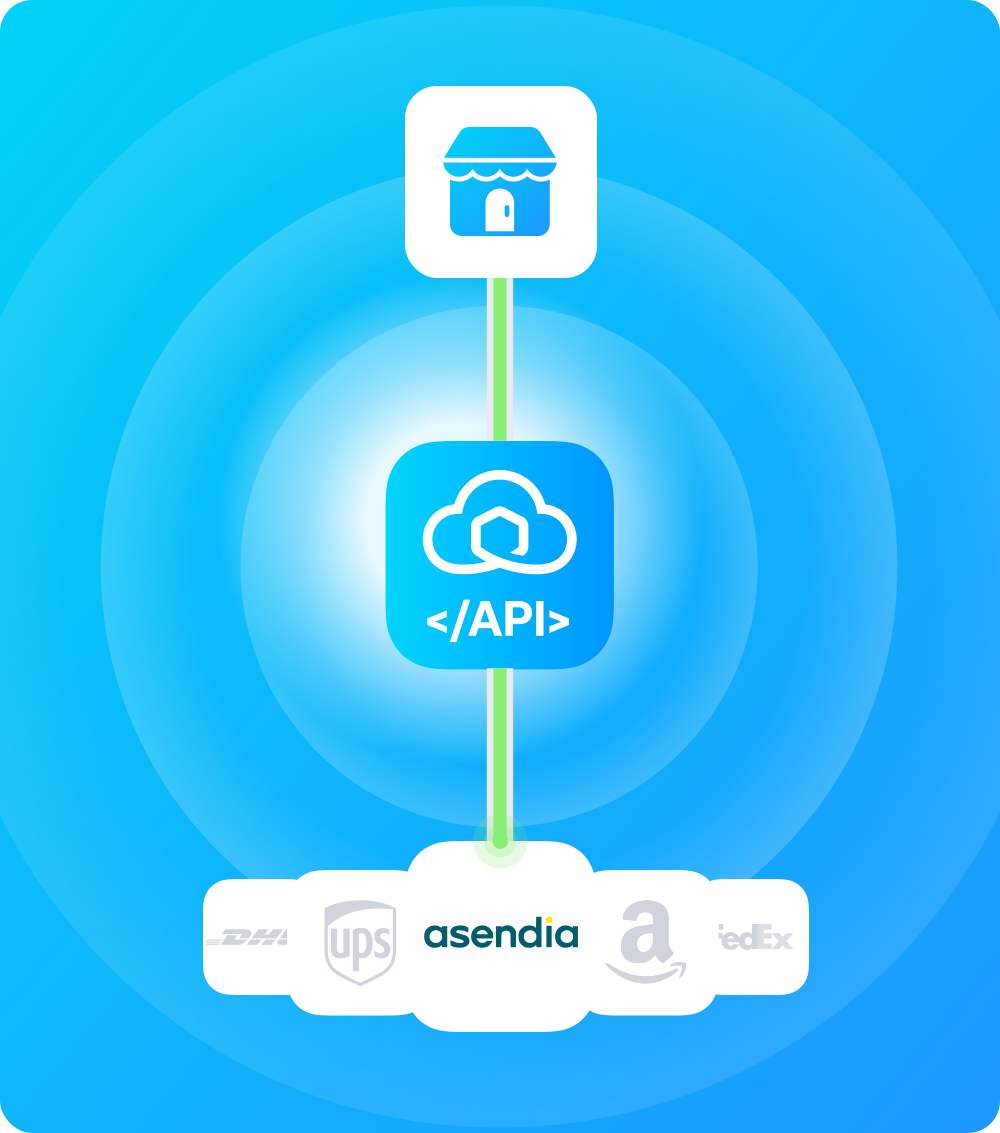
Add the Asendia API to your e-commerce backend or WMS through one Sendcloud integration, alongside 170+ other carriers. Ship lightweight cross-border parcels to 200+ countries without a separate Asendia integration.
The Asendia API, minus the integration work
Add the Asendia API to your e-commerce backend or WMS through one Sendcloud integration, alongside 170+ other carriers. Ship lightweight cross-border parcels to 200+ countries without a separate Asendia integration.
The Asendia API, minus the integration work
Add the Asendia API to your e-commerce backend or WMS through one Sendcloud integration, alongside 170+ other carriers. Ship lightweight cross-border parcels to 200+ countries without a separate Asendia integration.
Thoroughly documented
Tested on millions of shipments
Available on all plans
Why integrate Asendia through the Sendcloud API?

Lightweight international parcels and e-packets
Asendia is a joint venture between Swiss Post and La Poste France, specialized in cross-border e-commerce delivery. Sendcloud manages label creation, customs data, and tracking for every destination.

200+ countries via postal partnerships
Asendia routes via postal and private-carrier partnerships chosen per destination for cost and transit time. Sendcloud handles HS code submission and destination routing as part of the label call.

Integrate with 170+ carriers at once
Stop maintaining and integrating different carrier and use one API for all.

GDPR Compliance
We comply with the GDPR rules to protect data and privacy in Europe.

API uptime of 99.99%
Reliable shipping software built on AWS and with top market technologies.

ISO 27001 Certified
The world’s most rigorous standards for information security.
Why integrate Asendia through the Sendcloud API?
Lightweight international parcels and e-packets
Asendia is a joint venture between Swiss Post and La Poste France, specialized in cross-border e-commerce delivery. Sendcloud manages label creation, customs data, and tracking for every destination.
200+ countries via postal partnerships
Asendia routes via postal and private-carrier partnerships chosen per destination for cost and transit time. Sendcloud handles HS code submission and destination routing as part of the label call.
Integrate with 170+ carriers at once
Stop maintaining and integrating different carrier and use one API for all.
GDPR Compliance
We comply with the GDPR rules to protect data and privacy in Europe.
API uptime of 99.99%
Reliable shipping software built on AWS and with top market technologies.
ISO 27001 Certified
The world’s most rigorous standards for information security.
Why integrate Asendia through the Sendcloud API?
Lightweight international parcels and e-packets
Asendia is a joint venture between Swiss Post and La Poste France, specialized in cross-border e-commerce delivery. Sendcloud manages label creation, customs data, and tracking for every destination.
200+ countries via postal partnerships
Asendia routes via postal and private-carrier partnerships chosen per destination for cost and transit time. Sendcloud handles HS code submission and destination routing as part of the label call.
Integrate with 170+ carriers at once
Stop maintaining and integrating different carrier and use one API for all.
GDPR Compliance
We comply with the GDPR rules to protect data and privacy in Europe.
API uptime of 99.99%
Reliable shipping software built on AWS and with top market technologies.
ISO 27001 Certified
The world’s most rigorous standards for information security.
The complete shipping API for any system
The complete shipping API for any system
The complete shipping API for any system
"Sendcloud allows us to connect to a lot of different carriers seamlessly."
Oscar Ziegler
Founder and CEO
-
Hive

"Sendcloud allows us to connect to a lot of different carriers seamlessly."
Oscar Ziegler
Founder and CEO
-
Hive
"Sendcloud allows us to connect to a lot of different carriers seamlessly."
Oscar Ziegler
Founder and CEO
-
Hive
API integration examples
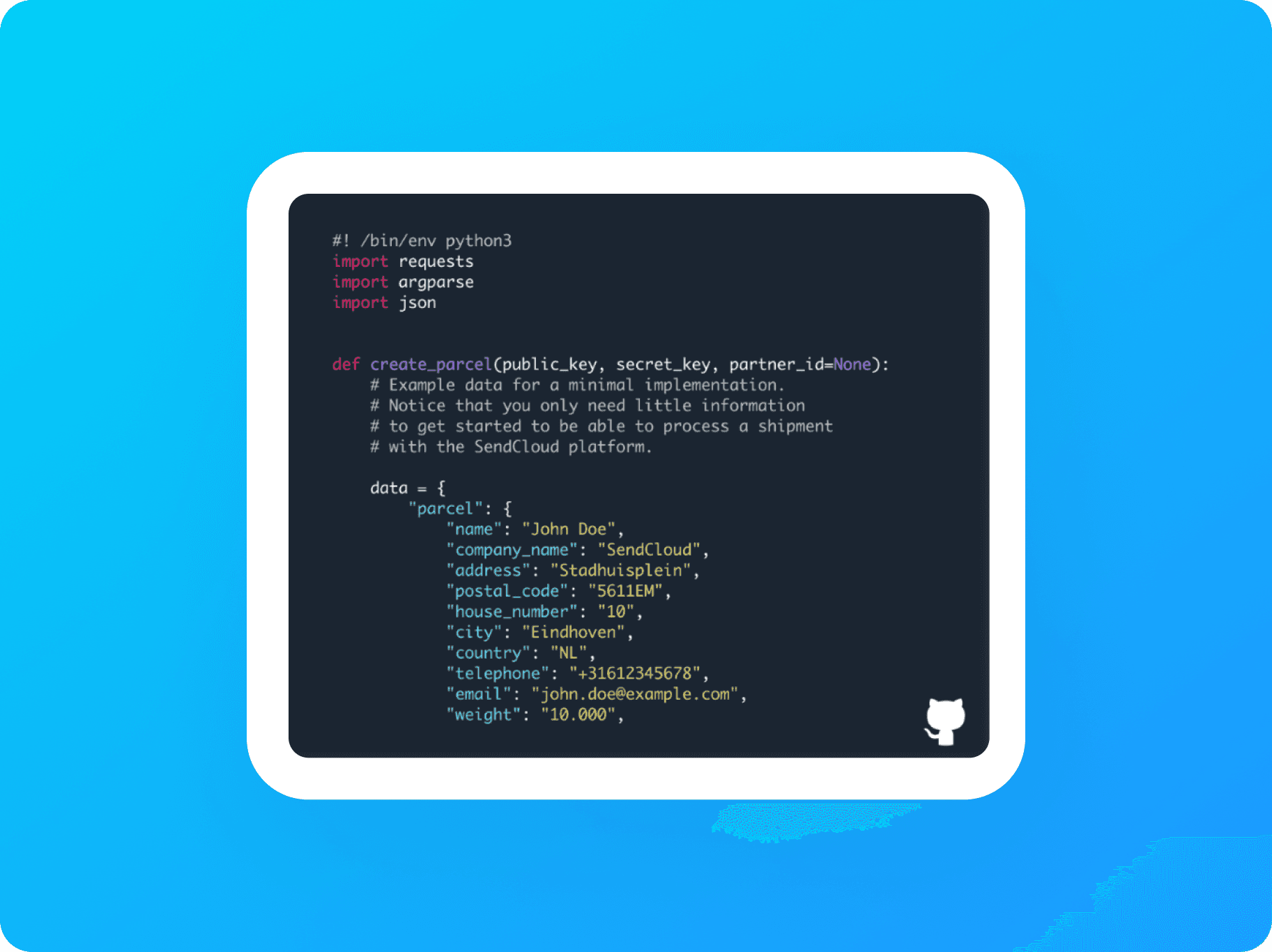
API Integration
See a basic example of an API integration using Python.
Service Point Picker
See how to integrate the Service Point Picker into a custom application.
API integration examples
API Integration
See a basic example of an API integration using Python.
Service Point Picker
See how to integrate the Service Point Picker into a custom application.
API integration examples
API Integration
See a basic example of an API integration using Python.
Service Point Picker
See how to integrate the Service Point Picker into a custom application.



Where do you start?
Where do you start?
Where do you start?


One API for all your shipping needs
No setup fees
Same-day integration
Ship with Europe's top carriers
Questions & answers
Why integrate the Asendia API through Sendcloud instead of directly?
Direct Asendia integration means handling separate credential sets for label creation and tracking, hub-routing logic (Benelux, Germany, or Direct injection), and end-of-day Asendia manifest generation in your own code.
Through Sendcloud, you authenticate once with your Sendcloud API key and use a single REST schema for Asendia alongside every other carrier in your account. A direct contract with Asendia is required either way; Sendcloud rates aren't offered for Asendia. The advantage of going through Sendcloud is consolidating Asendia with the rest of your carrier mix on one set of endpoints.
What happens when Asendia updates or breaks their API?
Asendia periodically updates injection-hub routing, tracking endpoints, and manifest formats. Direct integrators have to re-test against Asendia's environment when the carrier changes either the shipment or tracking system, and refresh credentials when authentication updates.
When you ship Asendia through the Sendcloud REST API, the abstraction layer absorbs those changes. Sendcloud's engineering monitors Asendia's developer documentation and adjusts the carrier connector internally. Your Sendcloud request schema stays the same regardless of which Asendia hub processes the parcel.
Can I use my own Asendia contract?
Yes. Asendia is only available through Sendcloud with a direct contract; Sendcloud rates aren't offered.
For setup: go to Shipping > Carriers > My Contracts, find Asendia, click Add Contract, and enter your CRM ID, label-creation Username and Password, separate tracking Client ID, Username, and Password, and select your Hub. Hub determines the injection point: Asendia Benelux, Asendia Germany, or Direct (only for high-volume merchants who arrange injection at the destination country directly).
A Lite plan or above is required. See the Asendia contract activation Help Center article.
Which Asendia products are supported through the API?
Asendia's cross-border international parcel and mail products are available through the integration, routing through the PostNL and La Poste joint-venture network. Specific shipping methods depend on your contract and the Hub you select (Asendia Benelux, Asendia Germany, or Direct).
The up-to-date list of methods enabled for your account lives in the Sendcloud shipping-methods endpoint. The Sendcloud API selects the correct routing automatically based on the Hub set on your contract, so you don't need carrier-specific routing logic in your code.
Which Asendia-specific features does the API expose?
Asendia-specific cross-border features exposed through the integration:
Hub selection (
Asendia Benelux,Asendia Germany,Direct) for injection-point routingSeparate tracking credentials for the Asendia tracking system
End-of-day Asendia manifest generation directly in the Sendcloud platform: go to Shipping > Orders > Created Labels, click Actions, and select Manifest for Asendia
Cross-border to most international destinations through the PostNL and La Poste network
The Asendia manifest is a hard requirement at handover: hand the generated manifest to the driver alongside your shipments to ensure correct billing.
How do I track Asendia parcels?
Asendia tracking requires the separate Asendia tracking credentials (Client ID, Username, Password) configured at contract setup. Without them, Asendia events won't flow into Sendcloud's webhook system.
All events normalise to Sendcloud's status taxonomy through GET https://panel.sendcloud.sc/api/v2/tracking/{tracking_number}, with the chronological history under statuses and each event mapped to parent_status. Subscribe to the parcel-status-changed webhook for push updates. Reference: Tracking parcels.
How do I create Asendia return labels?
Asendia return method availability depends on your contract and selected Hub. The Asendia manifest still applies at handover for inbound returns where the carrier requires it. The Sendcloud shipping-methods endpoint returns the methods enabled for your account.
All return labels are created through Sendcloud's standalone v3 Returns API (synchronous or asynchronous; async is recommended for higher throughput). No outgoing parcel lookup or JWT tokens are required. Reference: Returns API overview.
How does Sendcloud's multi-carrier API compare to connecting carriers individually?
The Sendcloud REST API gives you access to 170+ carriers, including Asendia, through one credential set, one schema, one webhook stream, and one error model. Connecting carriers individually means handling separate authentication, payload formats, and tracking systems for each, and redoing the work every time a carrier ships breaking changes upstream.
With Sendcloud, you ship Asendia alongside DHL, UPS, FedEx, and PostNL, or any other carrier in your account using the same code. Route shipments between carriers based on rules (weight, destination, service level, cost) without writing carrier-specific routing logic. Fall back to alternative carriers automatically if Asendia's upstream system has issues.
Adding a new carrier later means adding it to your Sendcloud account, not building a new integration.
Questions & answers
Why integrate the Asendia API through Sendcloud instead of directly?
Direct Asendia integration means handling separate credential sets for label creation and tracking, hub-routing logic (Benelux, Germany, or Direct injection), and end-of-day Asendia manifest generation in your own code.
Through Sendcloud, you authenticate once with your Sendcloud API key and use a single REST schema for Asendia alongside every other carrier in your account. A direct contract with Asendia is required either way; Sendcloud rates aren't offered for Asendia. The advantage of going through Sendcloud is consolidating Asendia with the rest of your carrier mix on one set of endpoints.
What happens when Asendia updates or breaks their API?
Asendia periodically updates injection-hub routing, tracking endpoints, and manifest formats. Direct integrators have to re-test against Asendia's environment when the carrier changes either the shipment or tracking system, and refresh credentials when authentication updates.
When you ship Asendia through the Sendcloud REST API, the abstraction layer absorbs those changes. Sendcloud's engineering monitors Asendia's developer documentation and adjusts the carrier connector internally. Your Sendcloud request schema stays the same regardless of which Asendia hub processes the parcel.
Can I use my own Asendia contract?
Yes. Asendia is only available through Sendcloud with a direct contract; Sendcloud rates aren't offered.
For setup: go to Shipping > Carriers > My Contracts, find Asendia, click Add Contract, and enter your CRM ID, label-creation Username and Password, separate tracking Client ID, Username, and Password, and select your Hub. Hub determines the injection point: Asendia Benelux, Asendia Germany, or Direct (only for high-volume merchants who arrange injection at the destination country directly).
A Lite plan or above is required. See the Asendia contract activation Help Center article.
Which Asendia products are supported through the API?
Asendia's cross-border international parcel and mail products are available through the integration, routing through the PostNL and La Poste joint-venture network. Specific shipping methods depend on your contract and the Hub you select (Asendia Benelux, Asendia Germany, or Direct).
The up-to-date list of methods enabled for your account lives in the Sendcloud shipping-methods endpoint. The Sendcloud API selects the correct routing automatically based on the Hub set on your contract, so you don't need carrier-specific routing logic in your code.
Which Asendia-specific features does the API expose?
Asendia-specific cross-border features exposed through the integration:
Hub selection (
Asendia Benelux,Asendia Germany,Direct) for injection-point routingSeparate tracking credentials for the Asendia tracking system
End-of-day Asendia manifest generation directly in the Sendcloud platform: go to Shipping > Orders > Created Labels, click Actions, and select Manifest for Asendia
Cross-border to most international destinations through the PostNL and La Poste network
The Asendia manifest is a hard requirement at handover: hand the generated manifest to the driver alongside your shipments to ensure correct billing.
How do I track Asendia parcels?
Asendia tracking requires the separate Asendia tracking credentials (Client ID, Username, Password) configured at contract setup. Without them, Asendia events won't flow into Sendcloud's webhook system.
All events normalise to Sendcloud's status taxonomy through GET https://panel.sendcloud.sc/api/v2/tracking/{tracking_number}, with the chronological history under statuses and each event mapped to parent_status. Subscribe to the parcel-status-changed webhook for push updates. Reference: Tracking parcels.
How do I create Asendia return labels?
Asendia return method availability depends on your contract and selected Hub. The Asendia manifest still applies at handover for inbound returns where the carrier requires it. The Sendcloud shipping-methods endpoint returns the methods enabled for your account.
All return labels are created through Sendcloud's standalone v3 Returns API (synchronous or asynchronous; async is recommended for higher throughput). No outgoing parcel lookup or JWT tokens are required. Reference: Returns API overview.
How does Sendcloud's multi-carrier API compare to connecting carriers individually?
The Sendcloud REST API gives you access to 170+ carriers, including Asendia, through one credential set, one schema, one webhook stream, and one error model. Connecting carriers individually means handling separate authentication, payload formats, and tracking systems for each, and redoing the work every time a carrier ships breaking changes upstream.
With Sendcloud, you ship Asendia alongside DHL, UPS, FedEx, and PostNL, or any other carrier in your account using the same code. Route shipments between carriers based on rules (weight, destination, service level, cost) without writing carrier-specific routing logic. Fall back to alternative carriers automatically if Asendia's upstream system has issues.
Adding a new carrier later means adding it to your Sendcloud account, not building a new integration.
Questions & answers
Why integrate the Asendia API through Sendcloud instead of directly?
Direct Asendia integration means handling separate credential sets for label creation and tracking, hub-routing logic (Benelux, Germany, or Direct injection), and end-of-day Asendia manifest generation in your own code.
Through Sendcloud, you authenticate once with your Sendcloud API key and use a single REST schema for Asendia alongside every other carrier in your account. A direct contract with Asendia is required either way; Sendcloud rates aren't offered for Asendia. The advantage of going through Sendcloud is consolidating Asendia with the rest of your carrier mix on one set of endpoints.
What happens when Asendia updates or breaks their API?
Asendia periodically updates injection-hub routing, tracking endpoints, and manifest formats. Direct integrators have to re-test against Asendia's environment when the carrier changes either the shipment or tracking system, and refresh credentials when authentication updates.
When you ship Asendia through the Sendcloud REST API, the abstraction layer absorbs those changes. Sendcloud's engineering monitors Asendia's developer documentation and adjusts the carrier connector internally. Your Sendcloud request schema stays the same regardless of which Asendia hub processes the parcel.
Can I use my own Asendia contract?
Yes. Asendia is only available through Sendcloud with a direct contract; Sendcloud rates aren't offered.
For setup: go to Shipping > Carriers > My Contracts, find Asendia, click Add Contract, and enter your CRM ID, label-creation Username and Password, separate tracking Client ID, Username, and Password, and select your Hub. Hub determines the injection point: Asendia Benelux, Asendia Germany, or Direct (only for high-volume merchants who arrange injection at the destination country directly).
A Lite plan or above is required. See the Asendia contract activation Help Center article.
Which Asendia products are supported through the API?
Asendia's cross-border international parcel and mail products are available through the integration, routing through the PostNL and La Poste joint-venture network. Specific shipping methods depend on your contract and the Hub you select (Asendia Benelux, Asendia Germany, or Direct).
The up-to-date list of methods enabled for your account lives in the Sendcloud shipping-methods endpoint. The Sendcloud API selects the correct routing automatically based on the Hub set on your contract, so you don't need carrier-specific routing logic in your code.
Which Asendia-specific features does the API expose?
Asendia-specific cross-border features exposed through the integration:
Hub selection (
Asendia Benelux,Asendia Germany,Direct) for injection-point routingSeparate tracking credentials for the Asendia tracking system
End-of-day Asendia manifest generation directly in the Sendcloud platform: go to Shipping > Orders > Created Labels, click Actions, and select Manifest for Asendia
Cross-border to most international destinations through the PostNL and La Poste network
The Asendia manifest is a hard requirement at handover: hand the generated manifest to the driver alongside your shipments to ensure correct billing.
How do I track Asendia parcels?
Asendia tracking requires the separate Asendia tracking credentials (Client ID, Username, Password) configured at contract setup. Without them, Asendia events won't flow into Sendcloud's webhook system.
All events normalise to Sendcloud's status taxonomy through GET https://panel.sendcloud.sc/api/v2/tracking/{tracking_number}, with the chronological history under statuses and each event mapped to parent_status. Subscribe to the parcel-status-changed webhook for push updates. Reference: Tracking parcels.
How do I create Asendia return labels?
Asendia return method availability depends on your contract and selected Hub. The Asendia manifest still applies at handover for inbound returns where the carrier requires it. The Sendcloud shipping-methods endpoint returns the methods enabled for your account.
All return labels are created through Sendcloud's standalone v3 Returns API (synchronous or asynchronous; async is recommended for higher throughput). No outgoing parcel lookup or JWT tokens are required. Reference: Returns API overview.
How does Sendcloud's multi-carrier API compare to connecting carriers individually?
The Sendcloud REST API gives you access to 170+ carriers, including Asendia, through one credential set, one schema, one webhook stream, and one error model. Connecting carriers individually means handling separate authentication, payload formats, and tracking systems for each, and redoing the work every time a carrier ships breaking changes upstream.
With Sendcloud, you ship Asendia alongside DHL, UPS, FedEx, and PostNL, or any other carrier in your account using the same code. Route shipments between carriers based on rules (weight, destination, service level, cost) without writing carrier-specific routing logic. Fall back to alternative carriers automatically if Asendia's upstream system has issues.
Adding a new carrier later means adding it to your Sendcloud account, not building a new integration.
Product
Solutions
Integrations
© 2026 Sendcloud. All Rights Reserved
Chamber of Commerce: 66572959
VAT number: NL856613897B01
Product
Integrations
Solutions
Resources
© 2026 Sendcloud. All Rights Reserved
Chamber of Commerce: 66572959
VAT number: NL856613897B01
Product
© 2026 Sendcloud. All Rights Reserved
Chamber of Commerce: 66572959
VAT number: NL856613897B01